MICROSOFT 365 BUSINESS
Microsoft 365 is cloud-powered productivity platform designed to help meet your organization’s
needs for robust security, reliability, and user collaboration productivity.

BUSINESS PLANS OPTIONS
at least 15% discount

MICROSOFT PARTNER
GOLD Cloud Platform
GOLD Cloud Business Application
GOLD Cloud Customer Relationship Management
GOLD Enterprise Resource Planning
GOLD Application Development
MICROSOFT 365 BUSINESS
-15%
Business Basic 365
PLAN
£4,90
£4,20
month
CONTENT:
– Web and mobile versions of
Microsoft 365 apps only
– Chat, call, meet up to 300 attendees
– 1 TB of cloud storage per user
– Business-class email
– Standard security
– Anytime phone and web support
– Desktop versions of Microsoft 365
apps with premium features
– Easily host webinars
– Attendee registration and reporting tools
– Manage customer appointments
– Advanced security
– Access and data control
– Cyberthreat protection
-15%
Which Microsoft 365 Licence Is Best for Your Business?
A practical guide for London SMEs, from an accredited Microsoft Solutions Partner for Modern Work
We have lost count with the number of times we have sat down with a London business owner who’s paying for the wrong Microsoft 365 licence. Sometimes they’re overpaying, for example a five-person consultancy on Business Premium because “that’s what the last IT company set up.” Alternatively some are underpaying in a way that’s quietly expensive, for example a firm handling client financial data on Business Basic, with no device management, no advanced threat protection, and no idea that’s the situation they’re in.
Microsoft doesn’t make this an easy decision. There are three core business tiers, each with a “with Teams” and “without Teams” variant, Copilot add-ons on top of all of them, and a July 2026 pricing update that’s changed the maths on which tier actually represents value. Add the fact that most businesses don’t need or want every employee on the same plan, and it’s easy to see why licensing decisions get made once at setup and never revisited.
This isn’t a sales pitch for the most expensive option. It’s the framework we use to match licences to actual business needs; because the right answer is completely different for a five-person creative studio in Shoreditch than it is for a 40-person accountancy in the City.
The three core plans, in plain terms
All three plans support up to 300 users, include 1 TB of OneDrive storage per user, and come with Exchange email, Teams, and SharePoint as standard. Where they diverge is desktop apps and security. Prices below are Microsoft’s current UK list prices, per user/month, paid annually, excluding VAT.
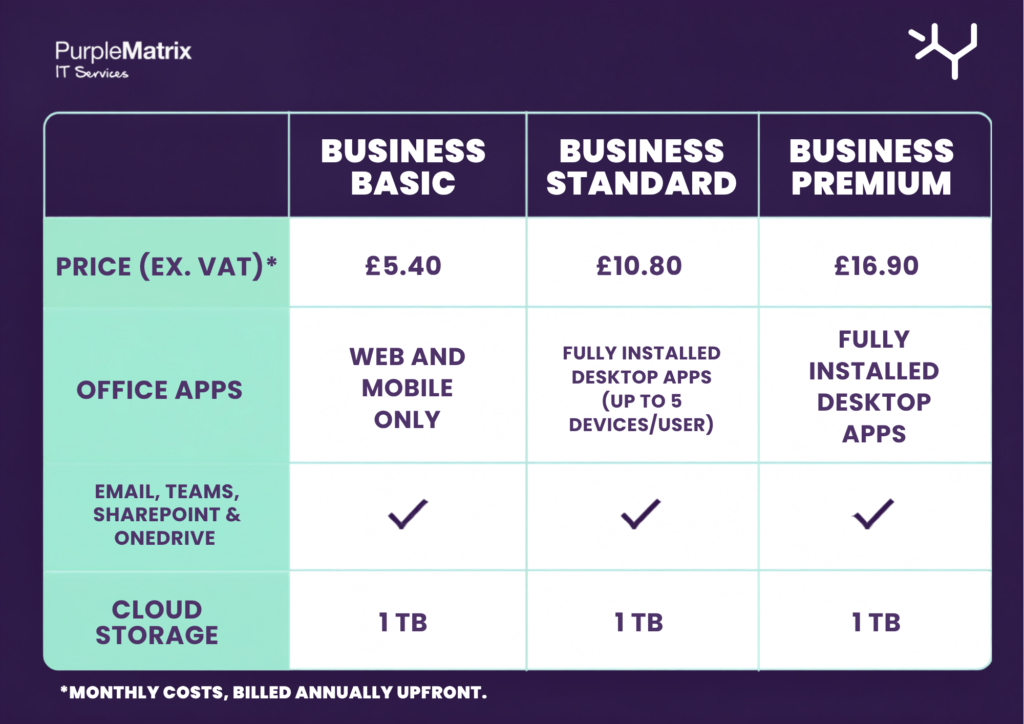
The headline shift since Microsoft’s July 2026 price update: Business Premium held its price while Basic and Standard both went up. The gap between Standard and Premium has narrowed to roughly £6/user/month, for a real jump in security capability. That changes the calculus for a lot of SMEs who’ve historically defaulted to Standard.
Copilot is available as an add-on across all three tiers for roughly £18–24.60/user/month depending on plan, bundling in AI-assisted drafting, research, and data analysis inside Word, Excel, PowerPoint, Outlook, and Teams.
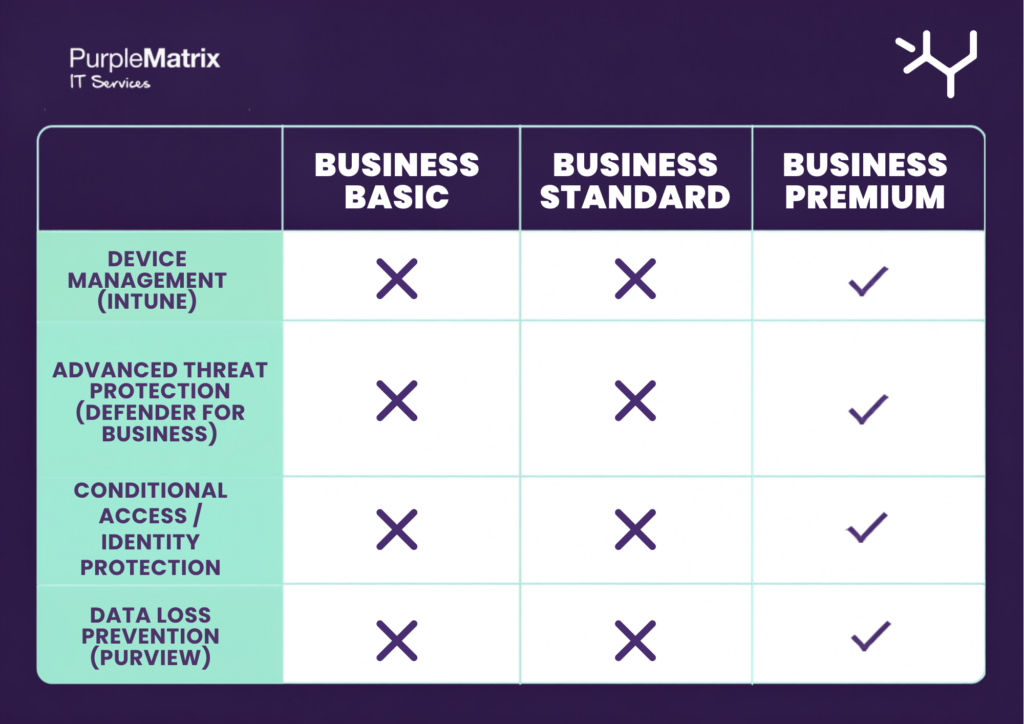
Matching the plan to your business, not the other way round.
Here’s where most licensing decisions go wrong: businesses pick a tier for the whole company, rather than asking what each role actually needs.
The lean creative or marketing studio (5–15 people, mostly browser-based, no client financial data) If your team lives in Figma, Canva, and Google-adjacent workflows and only touches Office apps occasionally, Business Basic covers email, Teams, and file storage without paying for desktop apps nobody installs. Just be honest about whether that’s really true. The moment someone needs to build a complex pitch deck offline on the train to a client meeting, Basic starts to chafe.
The professional services firm: accountants, solicitors, consultants (10–50 people, handles client data) This is the group we push hardest towards Business Premium, and it’s not really a discretionary call anymore. If you’re handling client financial records, case files, or personal data, you’re sitting on regulatory exposure (UK GDPR, and increasingly cyber insurance underwriters ask direct questions about MFA enforcement and endpoint protection) that Basic and Standard simply don’t cover. Defender for Business and Intune aren’t nice-to-haves here. They’re the difference between a phishing click being a non-event and being a breach notification to the ICO.
The fast-growing startup (15–40 people, hybrid/remote) Growth-stage teams tend to have the widest spread of devices: personal laptops, a mix of Mac and Windows, people joining from previous jobs with old habits. Business Premium’s conditional access and Intune device management let you enforce security policy without owning every device outright, which matters when you can’t mandate company hardware for budget reasons. Standard is tempting on price, but the device sprawl at this stage is exactly the risk profile Premium is built for.
The established SME with a mixed team (50–150 people) This is where “one licence for everyone” gets genuinely expensive and genuinely wasteful. The right answer is almost always a blend: Premium for anyone touching client data, finance, or HR; Standard for general staff who need desktop apps but handle lower-risk information; Basic or F3 for anyone who’s primarily communicating rather than producing documents. Microsoft explicitly supports mixing tiers within one tenant with no minimum seat count per plan. There is no penalty for doing this properly.
The mistake we see most often.
It’s not the wrong tier, it’s the static tier. A licensing mix that made sense at 12 people rarely still fits at 45. People change roles, an office-based team goes hybrid, a firm starts handling a new category of sensitive client data and nobody revisits what that means for security licensing. We’d recommend treating your Microsoft 365 licence mix the way you’d treat an insurance policy: reviewed at least annually, not set once and forgotten.
The second most common mistake is treating Business Premium’s security features as something to “get around to configuring” after purchase. Paying for Intune and Defender for Business without actually enrolling devices and setting conditional access policies is the licensing equivalent of buying a fire extinguisher and leaving it in the box.
Getting the decision right.
There’s no universally “best” Microsoft 365 licence, there is just the best one that matches what your people do and what your business is exposed to. For most London SMEs handling any client, financial, or personal data, that increasingly means Business Premium as the default, with Basic or F3 reserved deliberately for genuinely low-risk, low-usage roles.
As a Microsoft Solutions Partner accredited in Modern Work, this is the kind of assessment we run for clients before recommending anything: mapping actual roles and data sensitivity to the right mix of licences, rather than starting from a price list. If you’re not sure whether your current setup still fits your business, it’s worth a proper review rather than a guess.
Get in touch if you’d like us to run a free licensing and security review for your business.
365 Business Standard
PLAN
£10,30
£8,80
month
CONTENT:
– Web and mobile versions of
Microsoft 365 apps only
– Chat, call, meet up to 300 attendees
– 1 TB of cloud storage per user
– Business-class email
– Standard security
– Anytime phone and web support
– Desktop versions of Microsoft 365
apps with premium features
– Easily host webinars
– Attendee registration and reporting tools
– Manage customer appointments
– Advanced security
– Access and data control
– Cyberthreat protection
-15%
Which Microsoft 365 Licence Is Best for Your Business?
A practical guide for London SMEs, from an accredited Microsoft Solutions Partner for Modern Work
We have lost count with the number of times we have sat down with a London business owner who’s paying for the wrong Microsoft 365 licence. Sometimes they’re overpaying, for example a five-person consultancy on Business Premium because “that’s what the last IT company set up.” Alternatively some are underpaying in a way that’s quietly expensive, for example a firm handling client financial data on Business Basic, with no device management, no advanced threat protection, and no idea that’s the situation they’re in.
Microsoft doesn’t make this an easy decision. There are three core business tiers, each with a “with Teams” and “without Teams” variant, Copilot add-ons on top of all of them, and a July 2026 pricing update that’s changed the maths on which tier actually represents value. Add the fact that most businesses don’t need or want every employee on the same plan, and it’s easy to see why licensing decisions get made once at setup and never revisited.
This isn’t a sales pitch for the most expensive option. It’s the framework we use to match licences to actual business needs; because the right answer is completely different for a five-person creative studio in Shoreditch than it is for a 40-person accountancy in the City.
The three core plans, in plain terms
All three plans support up to 300 users, include 1 TB of OneDrive storage per user, and come with Exchange email, Teams, and SharePoint as standard. Where they diverge is desktop apps and security. Prices below are Microsoft’s current UK list prices, per user/month, paid annually, excluding VAT.
The headline shift since Microsoft’s July 2026 price update: Business Premium held its price while Basic and Standard both went up. The gap between Standard and Premium has narrowed to roughly £6/user/month, for a real jump in security capability. That changes the calculus for a lot of SMEs who’ve historically defaulted to Standard.
Copilot is available as an add-on across all three tiers for roughly £18–24.60/user/month depending on plan, bundling in AI-assisted drafting, research, and data analysis inside Word, Excel, PowerPoint, Outlook, and Teams.
Matching the plan to your business, not the other way round.
Here’s where most licensing decisions go wrong: businesses pick a tier for the whole company, rather than asking what each role actually needs.
The lean creative or marketing studio (5–15 people, mostly browser-based, no client financial data) If your team lives in Figma, Canva, and Google-adjacent workflows and only touches Office apps occasionally, Business Basic covers email, Teams, and file storage without paying for desktop apps nobody installs. Just be honest about whether that’s really true. The moment someone needs to build a complex pitch deck offline on the train to a client meeting, Basic starts to chafe.
The professional services firm: accountants, solicitors, consultants (10–50 people, handles client data) This is the group we push hardest towards Business Premium, and it’s not really a discretionary call anymore. If you’re handling client financial records, case files, or personal data, you’re sitting on regulatory exposure (UK GDPR, and increasingly cyber insurance underwriters ask direct questions about MFA enforcement and endpoint protection) that Basic and Standard simply don’t cover. Defender for Business and Intune aren’t nice-to-haves here. They’re the difference between a phishing click being a non-event and being a breach notification to the ICO.
The fast-growing startup (15–40 people, hybrid/remote) Growth-stage teams tend to have the widest spread of devices: personal laptops, a mix of Mac and Windows, people joining from previous jobs with old habits. Business Premium’s conditional access and Intune device management let you enforce security policy without owning every device outright, which matters when you can’t mandate company hardware for budget reasons. Standard is tempting on price, but the device sprawl at this stage is exactly the risk profile Premium is built for.
The established SME with a mixed team (50–150 people) This is where “one licence for everyone” gets genuinely expensive and genuinely wasteful. The right answer is almost always a blend: Premium for anyone touching client data, finance, or HR; Standard for general staff who need desktop apps but handle lower-risk information; Basic or F3 for anyone who’s primarily communicating rather than producing documents. Microsoft explicitly supports mixing tiers within one tenant with no minimum seat count per plan. There is no penalty for doing this properly.
The mistake we see most often.
It’s not the wrong tier, it’s the static tier. A licensing mix that made sense at 12 people rarely still fits at 45. People change roles, an office-based team goes hybrid, a firm starts handling a new category of sensitive client data and nobody revisits what that means for security licensing. We’d recommend treating your Microsoft 365 licence mix the way you’d treat an insurance policy: reviewed at least annually, not set once and forgotten.
The second most common mistake is treating Business Premium’s security features as something to “get around to configuring” after purchase. Paying for Intune and Defender for Business without actually enrolling devices and setting conditional access policies is the licensing equivalent of buying a fire extinguisher and leaving it in the box.
Getting the decision right.
There’s no universally “best” Microsoft 365 licence, there is just the best one that matches what your people do and what your business is exposed to. For most London SMEs handling any client, financial, or personal data, that increasingly means Business Premium as the default, with Basic or F3 reserved deliberately for genuinely low-risk, low-usage roles.
As a Microsoft Solutions Partner accredited in Modern Work, this is the kind of assessment we run for clients before recommending anything: mapping actual roles and data sensitivity to the right mix of licences, rather than starting from a price list. If you’re not sure whether your current setup still fits your business, it’s worth a proper review rather than a guess.
Get in touch if you’d like us to run a free licensing and security review for your business.
365 Business Premium
PLAN
£18,10
£15,40
month
CONTENT:
Microsoft 365 apps only
– Chat, call, meet up to 300 attendees
– 1 TB of cloud storage per user
– Business-class email
– Standard security
– Anytime phone and web support
– Desktop versions of Microsoft 365
apps with premium features
– Easily host webinars
– Attendee registration and reporting tools
– Manage customer appointments
– Advanced security
– Access and data control
– Cyberthreat protection
-15%
Which Microsoft 365 Licence Is Best for Your Business?
A practical guide for London SMEs, from an accredited Microsoft Solutions Partner for Modern Work
We have lost count with the number of times we have sat down with a London business owner who’s paying for the wrong Microsoft 365 licence. Sometimes they’re overpaying, for example a five-person consultancy on Business Premium because “that’s what the last IT company set up.” Alternatively some are underpaying in a way that’s quietly expensive, for example a firm handling client financial data on Business Basic, with no device management, no advanced threat protection, and no idea that’s the situation they’re in.
Microsoft doesn’t make this an easy decision. There are three core business tiers, each with a “with Teams” and “without Teams” variant, Copilot add-ons on top of all of them, and a July 2026 pricing update that’s changed the maths on which tier actually represents value. Add the fact that most businesses don’t need or want every employee on the same plan, and it’s easy to see why licensing decisions get made once at setup and never revisited.
This isn’t a sales pitch for the most expensive option. It’s the framework we use to match licences to actual business needs; because the right answer is completely different for a five-person creative studio in Shoreditch than it is for a 40-person accountancy in the City.
The three core plans, in plain terms
All three plans support up to 300 users, include 1 TB of OneDrive storage per user, and come with Exchange email, Teams, and SharePoint as standard. Where they diverge is desktop apps and security. Prices below are Microsoft’s current UK list prices, per user/month, paid annually, excluding VAT.
The headline shift since Microsoft’s July 2026 price update: Business Premium held its price while Basic and Standard both went up. The gap between Standard and Premium has narrowed to roughly £6/user/month, for a real jump in security capability. That changes the calculus for a lot of SMEs who’ve historically defaulted to Standard.
Copilot is available as an add-on across all three tiers for roughly £18–24.60/user/month depending on plan, bundling in AI-assisted drafting, research, and data analysis inside Word, Excel, PowerPoint, Outlook, and Teams.
Matching the plan to your business, not the other way round.
Here’s where most licensing decisions go wrong: businesses pick a tier for the whole company, rather than asking what each role actually needs.
The lean creative or marketing studio (5–15 people, mostly browser-based, no client financial data) If your team lives in Figma, Canva, and Google-adjacent workflows and only touches Office apps occasionally, Business Basic covers email, Teams, and file storage without paying for desktop apps nobody installs. Just be honest about whether that’s really true. The moment someone needs to build a complex pitch deck offline on the train to a client meeting, Basic starts to chafe.
The professional services firm: accountants, solicitors, consultants (10–50 people, handles client data) This is the group we push hardest towards Business Premium, and it’s not really a discretionary call anymore. If you’re handling client financial records, case files, or personal data, you’re sitting on regulatory exposure (UK GDPR, and increasingly cyber insurance underwriters ask direct questions about MFA enforcement and endpoint protection) that Basic and Standard simply don’t cover. Defender for Business and Intune aren’t nice-to-haves here. They’re the difference between a phishing click being a non-event and being a breach notification to the ICO.
The fast-growing startup (15–40 people, hybrid/remote) Growth-stage teams tend to have the widest spread of devices: personal laptops, a mix of Mac and Windows, people joining from previous jobs with old habits. Business Premium’s conditional access and Intune device management let you enforce security policy without owning every device outright, which matters when you can’t mandate company hardware for budget reasons. Standard is tempting on price, but the device sprawl at this stage is exactly the risk profile Premium is built for.
The established SME with a mixed team (50–150 people) This is where “one licence for everyone” gets genuinely expensive and genuinely wasteful. The right answer is almost always a blend: Premium for anyone touching client data, finance, or HR; Standard for general staff who need desktop apps but handle lower-risk information; Basic or F3 for anyone who’s primarily communicating rather than producing documents. Microsoft explicitly supports mixing tiers within one tenant with no minimum seat count per plan. There is no penalty for doing this properly.
The mistake we see most often.
It’s not the wrong tier, it’s the static tier. A licensing mix that made sense at 12 people rarely still fits at 45. People change roles, an office-based team goes hybrid, a firm starts handling a new category of sensitive client data and nobody revisits what that means for security licensing. We’d recommend treating your Microsoft 365 licence mix the way you’d treat an insurance policy: reviewed at least annually, not set once and forgotten.
The second most common mistake is treating Business Premium’s security features as something to “get around to configuring” after purchase. Paying for Intune and Defender for Business without actually enrolling devices and setting conditional access policies is the licensing equivalent of buying a fire extinguisher and leaving it in the box.
Getting the decision right.
There’s no universally “best” Microsoft 365 licence, there is just the best one that matches what your people do and what your business is exposed to. For most London SMEs handling any client, financial, or personal data, that increasingly means Business Premium as the default, with Basic or F3 reserved deliberately for genuinely low-risk, low-usage roles.
As a Microsoft Solutions Partner accredited in Modern Work, this is the kind of assessment we run for clients before recommending anything: mapping actual roles and data sensitivity to the right mix of licences, rather than starting from a price list. If you’re not sure whether your current setup still fits your business, it’s worth a proper review rather than a guess.
Get in touch if you’d like us to run a free licensing and security review for your business.
SHADOW AI: The Silent Risk Growing Inside Your Organisation
There’s a good chance someone on your team used AI today without telling anyone.
Not maliciously. Not even consciously as a policy decision. They pasted a client email into ChatGPT to draft a reply faster. They uploaded a spreadsheet to get a quick summary. They asked an AI tool to help debug code that touches production systems. None of it went through IT. None of it was approved, tracked, or even discussed.
This is Shadow AI, and if your company hasn’t addressed it yet, it’s probably already happening.
What Shadow AI Actually Is
Shadow AI is the AI equivalent of “shadow IT”: the unsanctioned software employees started installing on their laptops years before anyone had a formal SaaS policy. The difference is that shadow AI moves faster, touches more sensitive data, and is far harder to detect.
Where shadow IT usually meant an unauthorised app on a device, shadow AI often means unauthorised thinking; employees feeding company data, client information, or proprietary strategy into tools that live entirely outside your company’s control. There’s no login to monitor. No admin console. No audit trail. Just a browser tab.
And it’s not a fringe behaviour. Multiple recent workplace surveys have found that most employees now use generative AI tools at work, and a significant share do so without their employer’s knowledge or approval. The tools are free, fast, and genuinely useful, so adoption has outpaced governance almost everywhere. It’s one of the most common patterns we see in AI business consulting work with growing companies.
Why It’s a Bigger Risk Than It Looks
It’s tempting to treat this as a minor compliance footnote. It isn’t. A few reasons shadow AI deserves real attention from leadership:
Data exposure. Once information is pasted into a third-party AI tool, you generally lose visibility into how it’s stored, used, or retained. Client contracts, financial figures, source code, and personal data have all ended up in tools never vetted for that purpose. It’s a useful reminder of why Copilot security: the data handling, permissions, and tenant boundaries built into enterprise tools, tends to look so different from what’s available in a free, consumer-grade chatbot.
Inconsistent accuracy. Employees using ungoverned tools have no shared standard for verifying AI output. A hallucinated statistic or fabricated citation can travel from a chatbot straight into a client deliverable with nobody checking it.
Regulatory and contractual exposure. Many industries have obligations around data handling that were written before generative AI existed. Employees using shadow AI tools may be unknowingly violating them.
No accountability trail. When something goes wrong, “who approved this and why” is usually the first question asked. With shadow AI, the honest answer is often: no one did.
Lost opportunity. Perhaps the most overlooked cost: when AI use is invisible, leadership can’t learn from it. The workarounds employees invent to save time are exactly the workflows worth formalising and scaling. Left unmanaged, shadow AI hides your best ideas along with your biggest risks. And with them, real AI productivity gains the business could otherwise capture.
Why Banning AI Doesn’t Work
The instinctive response for many businesses is to lock it down. Block AI tools at the network level, issue a memo, consider the problem solved.
It rarely works, and it often backfires. Employees who find a tool genuinely useful will simply switch to their personal devices or personal accounts, which removes the behaviour from view entirely rather than eliminating it. You lose visibility for the sake of the appearance of control.
The companies navigating this well aren’t the ones banning AI. They’re the ones getting ahead of it.
What Getting Ahead of It Looks Like
A few starting points for leadership teams grappling with shadow AI:
Start with visibility, not punishment. Before writing policy, understand what’s actually happening. Anonymous surveys, informal conversations, and IT usage data (where available) can reveal how deep the practice already runs.
Provide a sanctioned alternative. Employees turn to shadow AI largely because there’s no approved option, or the approved option is clunky or slow. Many businesses find this is where Microsoft Copilot earns its place: it sits inside the Microsoft 365 tools employees already use, with enterprise-grade data protection built in, rather than asking staff to trust an unknown third-party tool with sensitive information. A well-scoped Copilot deployment, aligned to your organisation’s data and permissions, tends to remove much of the incentive to go around the system in the first place.
Write a policy people can actually follow. Blanket prohibitions get ignored. Practical guidance, such as what data can and can’t be entered into AI tools, which use cases need human review, who to ask when unsure, will get followed. Clarity beats restriction.
Invest in training, not just tooling. Rolling out a licence is the easy part. Businesses that see genuine returns tend to pair any deployment with proper Microsoft Copilot training, so employees understand not just how to use it, but when to trust it and when to double-check it.
Make governance a living process, not a one-time memo. AI capabilities and employee use cases are changing monthly. A policy written once and left untouched for a year will be obsolete long before then.
Treat this as a leadership issue, not just an IT one. Shadow AI sits at the intersection of data security, legal risk, HR policy, and day-to-day productivity. It needs sponsorship from leadership, not just a line item in the IT handbook.
The Bottom Line
Shadow AI isn’t a hypothetical risk for some future date. It’s a present-tense reality inside most businesses right now, whether leadership has acknowledged it or not. The question isn’t whether employees are using AI. It’s whether your business is going to shape how they do it, or find out the hard way what happens when nobody does.
A Microsoft AI foundation, built around Copilot rather than a patchwork of ungoverned tools, is increasingly how businesses are answering that question, giving them visibility and security without needing the budget or headcount of a much larger organisation. It’s a shift that’s particularly relevant for AI for SMEs, where the gap between “using AI” and “governing AI” tends to be widest.
Purple Matrix is a Microsoft Solutions Partner helping businesses navigate the practical realities of AI adoption in the workplace. Get in touch to talk through where your organisation stands.
365 Apps for Business
PLAN
£8,60
£7,40
month
CONTENT:
apps with premium features
– 1 TB of cloud storage per user
– Standard security
– Anytime phone and web support
– Chat, call, meet up to 300 attendees
– Business-class email
– Web and mobile versions of
Microsoft 365 apps only
– Easily host webinars
– Attendee registration and reporting tools
– Manage customer appointments
– Advanced security
– Access and data control
– Cyberthreat protection
Do not miss out on this incredible opportunity to get your hands on Microsoft 365 products at heavily discounted rates – after all it’s just a ‘change of billing exercise’ that can be done in minutes; no migration work is required.

Whatever IT requirements you have, whatever IT related challenges you face, whatever technology mountains your business needs to climb, we are only a phonecall away.
CONTACT INFO
Micawber Wharf 17 Micawber Street London N1 7TB
020 3994 5353
info@purplematrix.co.uk
FOR MORE INFO CONTACT US
CONTACT INFO
Micawber Wharf 17 Micawber Street London N1 7TB
020 3994 5353
info@purplematrix.co.uk
DRUŠTVENE MREŽE
FOR MORE INFO CONTACT US
Copyright © 2023. All rights reserved Designed and developed by PurpleKey.ba
Terms and Conditions
Privacy Policy